
How to activate the program
Method 1: enter the license key in the program. It takes a minute and needs an internet connection.
Four steps, about a minute
After your purchase you will receive an e-mail with your license key, normally within a few minutes. Enter it in the program as shown below, or use the offline method if the program cannot reach the internet.
-
1
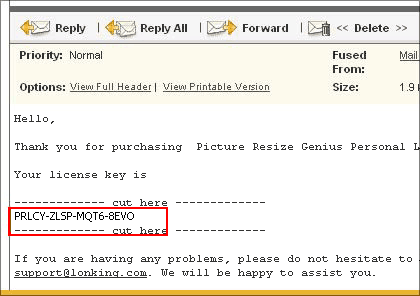
Copy the license key
Open the e-mail with your license key. Mark (highlight) the license key in that e-mail and copy it to the clipboard by pressing CTRL+C.
-
2
Open the registration dialog
Start the program and open the UNREGISTERED dialog box: click the Help menu item and choose Registration.
-
3
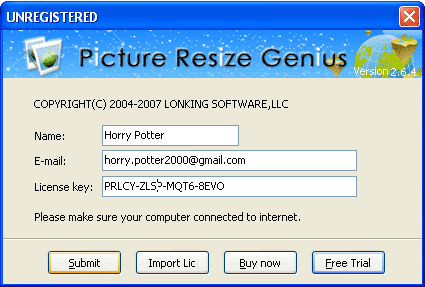
Enter your details and submit
Enter your name and e-mail address, then paste the license key from the clipboard into the text box by pressing CTRL+V. Press Submit.
-
4
Restart the program
After your license data has been downloaded, press OK and restart the program. If you cannot complete the registration this way, please use the second method.
Thank you for choosing our software.