
Activate by importing license data
Method 2: for computers that cannot reach our activation server, for example behind a corporate firewall.
Six steps, no direct connection needed
Use this method if the program cannot reach our activation server directly, for example behind a corporate firewall.
-
1
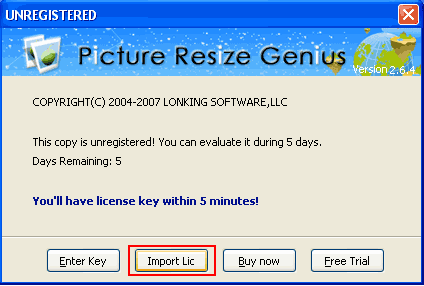
Open the import dialog
Click the Import License button on the UNREGISTERED dialog box (or select the Help menu item, then choose Import License).
-
2
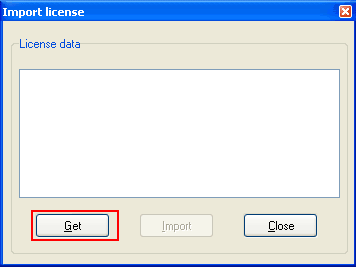
Click the Get button
Click the Get button on the dialog box that opens. Your browser will open our activation page.
-
3
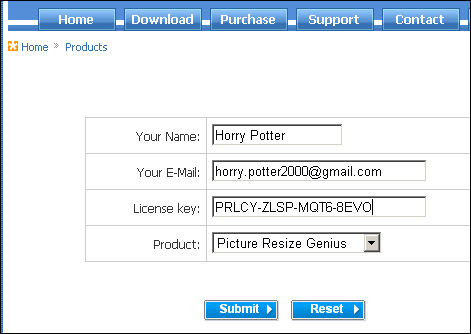
Submit your registration information
Input your registration information and click the Submit button in the open browser.
-
4
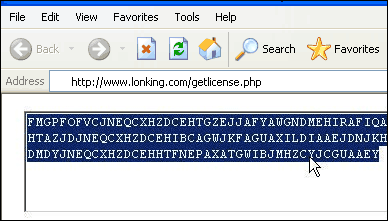
Copy the result data
Copy the whole result data block from the open browser window.
-
5
Paste it back into the program
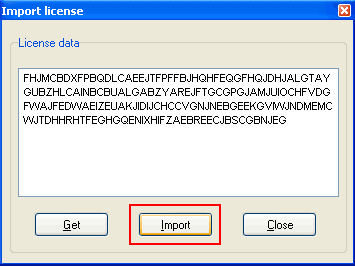
Paste the result data into the License data box on the dialog box, then click the Import button.
-
6
Restart the program
Click the Yes button, then restart the program. If you cannot complete the registration this way, please use the first method.
Thank you for choosing our software.